startService()系列
startService()生命周期
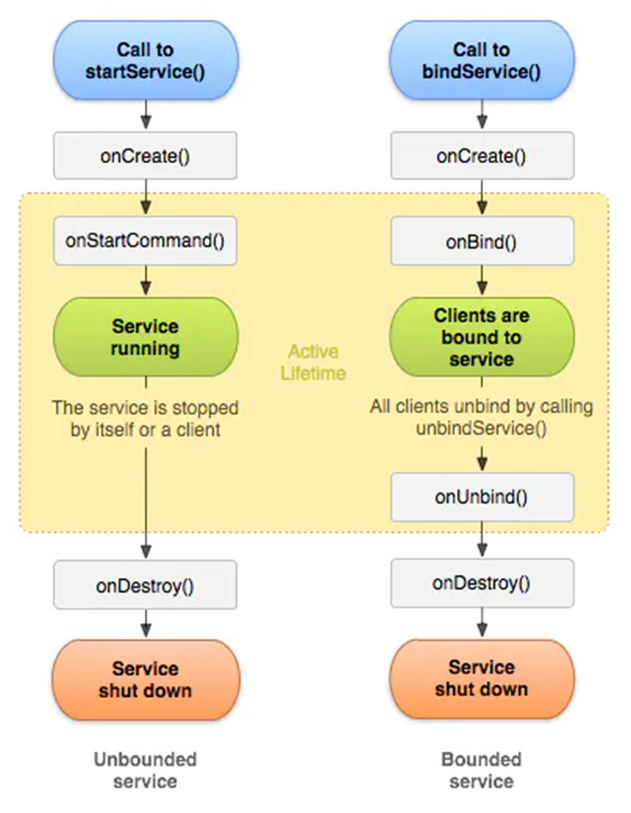
(1) startService()首次启动服务
调用流程:context.startService() -> onCreate() -> onStartCommand() -> Service running
startService(intent):Android 8.0之前,可在本APP或跨APP调用startService(),但Android 8.0之后对启动后台应用的Service做了一些限制,否则调用方会发生FC。之后服务会一直在后台运行,调用stopStervice()或被系统杀死可以停止Service。
onCreate():当用Context.startService()和Context.bindService()首次启动服务时,会回调onCreate(),在整个生命周期中,只会回调一次。也是生命周期方法中第一个被回调的,系统将调用该方法来执行一些一次性的设置。
onStartCommand():每次执行startService()都会调用一次onStartCommond(),如果我们希望服务一旦启动就立刻去执行某个动作,就可以将逻辑写在onStartCommand()方法里。需要注意的是,Context.bindService()启动Service不会回调这个方法。
(2) Service已启动,再次调用startService()
执行条件:目标Service已经通过startService()或bindService()启动。
调用流程:context.startService() -> onStartCommand()
此时不会再调用onCreate()。
(3) stopService()停止服务
执行条件:没有其它组件绑定该Service。
调用流程:context.stopService() -> onDestroy() -> Service stop
startForegroundService()生命周期
调用流程:context.startForegroundService() -> onCreate() -> onStartCommand(){ startForeground(int id, Notification notification) } -> Service running
调用startForegroundService()后,需要在5s内在该Service中调用startForeground()以显示前台服务。
其它同startService()一样,停止Service时用stopForegroundService()。
Android 8.0对startSevice()的限制
Android O 后台startService限制简析—阿里云
在Android 8.0及之后,Google推出出了Background Execution Limits,因为在后台中运行的 Service 会消耗设备资源,这可能会降低用户体验。 为了缓解这一问题,系统对这些 Service 施加了一些限制。一个很明显的改变就是不准后台应用通过startService()启动服务(无论调用者是谁,自身或其它APP),但同时也添加了startForegroundService()这个API。
首先要搞清楚什么是前台与后台应用,需要注意的是,用于 Service 限制目的的后台定义与内存管理使用的定义不同,例如一个应用按照内存管理的定义可能处于后台,但按照是否能够启动 Service 的定义又处于前台。以启动Service来看,以下应用被视为处于前台:
- 具有可见的Activity;
- 具有前台Service;
- 另一个前台应用关联到该应用,如绑定到该应用的一个Service,使用该应用的ContentProvider。
当应用的Activity不可见时,在持续数分钟的时间窗内(MIUI为1min),后台应用将被置于一个临时白名单中,仍然可以使用startService()启动该应用的Service。但过了这个时间窗后,再调用startService()将会发生android.app.BackgroundServiceStartNotAllowedException的异常,调用方会FC。
以上只是对startService()有影响,对bindService()来说,无论应用是否处于前后台,其他组件都可以绑定到该 Service。
在 Android 8.0 之前,创建前台Service的方式通常是先创建一个后台Service,然后将该Service推到前台。Android 8.0有一项复杂功能:系统不允许后台应用创建后台Service。因此,Android 8.0引入了一种全新的方法,即 startForegroundService(),以在前台启动新Service。在系统创建Service后,应用有10秒的时间来调用该Service的startForeground()方法以显示新Service 的用户可见通知。 如果应用在此时间限制内未调用 startForeground(),则系统将停止此 Service 并声明此应用为 ANR。
后台应用启动Service的FC堆栈:
2022-07-20 20:01:18.271 21901-21901/? E/AndroidRuntime: FATAL EXCEPTION: main
    Process: com.demoapp.getservicedemo, PID: 21901
    android.app.BackgroundServiceStartNotAllowedException: Not allowed to start service Intent { act=com.demoapp.servicedemo.ServiceAction pkg=com.demoapp.servicedemo }: app is in background uid null
        at android.app.ContextImpl.startServiceCommon(ContextImpl.java:1872)
        at android.app.ContextImpl.startService(ContextImpl.java:1828)
        at android.content.ContextWrapper.startService(ContextWrapper.java:786)
        at android.content.ContextWrapper.startService(ContextWrapper.java:786)
        at com.demoapp.getservicedemo.MainActivity.startRemoteService(MainActivity.java:65)
        at com.demoapp.getservicedemo.MainActivity.lambda$onCreate$0$MainActivity(MainActivity.java:40)
        at com.demoapp.getservicedemo.-$$Lambda$MainActivity$Zqzf6K5KRkkI1SuZgc3pj8h50ik.onClick(Unknown Source:2)
        at android.view.View.performClick(View.java:7761)
        at com.google.android.material.button.MaterialButton.performClick(MaterialButton.java:1119)
        at android.view.View.performClickInternal(View.java:7738)
        at android.view.View.access$3700(View.java:858)
        at android.view.View$PerformClick.run(View.java:29163)
        at android.os.Handler.handleCallback(Handler.java:938)
        at android.os.Handler.dispatchMessage(Handler.java:99)
        at android.os.Looper.loopOnce(Looper.java:211)
        at android.os.Looper.loop(Looper.java:300)
        at android.app.ActivityThread.main(ActivityThread.java:8258)
        at java.lang.reflect.Method.invoke(Native Method)
        at com.android.internal.os.RuntimeInit$MethodAndArgsCaller.run(RuntimeInit.java:556)
        at com.android.internal.os.ZygoteInit.main(ZygoteInit.java:1049)
bindService()系列
Bound services overview——developer.android
bindService()生命周期
返回值:bindService() 的返回值指示所请求的服务是否存在,以及是否允许客户端访问该服务。返回true并不表示连接成功,回调到onServiceConnected()才表示连接成功。
(1) Service未运行,bindService()首次绑定服务
执行条件:Service未运行
调用流程:context.bindService() -> onCreate() -> onBind() -> Service running
- bindService():将调用方组件和Service绑定起来,之后可以通过unBindService()来解绑。
- onCreate():同startService()流程中一样。
- onBind():Context.bindService()首次绑定Service会回调这个方法,启动者可通过该方法返回的Binder对象来对Service对象进行操控。在已绑定Service的情况下不会执行该方法。
(2) Service运行中,客户端B调用bindService()首次绑定服务
执行条件1:Service已在进程A中通过bindService(intent, mConnection, flag)启动,而本次启动的intent与进程A的intent相同。
调用流程:Service running -> context.bindService() -> 直接返回进程A中的IBinder,不会调用onBind()
执行条件2:Service已在进程A中通过bindService(intent, mConnection, flag)启动,而本次启动的intent与进程A的intent不相同。
调用流程:Service running -> context.bindService() -> onBind()
执行条件3:Service已在进程A中通过startService(intent)启动,而本次使用bindService(),intent无所谓是否相同
调用流程:Service running -> context.bindService() -> onBind()
(3) 第2次调用bindService()
执行条件1:当前组件之前已调用过bindService(),且未解绑,此次intent相同。
调用流程:Service running -> context.bindService() -> 不会执行任何回调方法。
执行条件2:当前组件之前已调用过bindService(),且未解绑,此次intent不相同。
调用流程:Service running -> context.bindService() -> onBind() -> 客户端:onServiceDisconnected() -> onServiceConnected()
执行条件3:当前组件之前已调用过bindService(),且已解绑,再次调用bindService()。
调用流程:Service running -> context.bindService() -> 不会执行任何回调方法。
(4) 调用unbindService()解绑
- onUnBind:用 Context.unbindService()触发此方法,Service类中的方法默认返回 false。当用户重载并返回值 true 后,再次调用 Context.bindService()时将触发onRebind()方法。
执行条件1:在Service还有其它组件连接的情况下(如1使用startService()开启Service;2还有其它组件通过bindService(intent,mConn,BIND_AUTO_CREATE)连接),且当前组件通过bindService()绑定Service,最后执行unbindService()
调用流程:context.unbindService() -> onUnbind()
执行条件2:Service通过bindService()启动,且当前只有本组件连接到Service,最后调用unbindService()解绑
调用流程:context.unbindService() -> onUnbind() -> onDestroy()
bindService()规范使用方法
Bound services overview——developer.android
(1) mIsBound标记绑定状态
需要用一个布尔变量mIsBound标记是否绑定,在调用与服务相关的方法前先判断一下false或true,否则会抛出异常。
在以下情况中设置值:
- 初始时置mIsBound=false,表示未绑定;
- 绑定成功后,在onServiceConnected()回调中置mIsBound=true;
注:有的官方Demo在调用bindService()后置mIsBound=true,或者直接mIsBound=bindService(…)。但个人感觉在onServiceConnected()中置mIsBound=true比较稳妥。
- 解绑后,在调用unbindService()后置mIsBound=false;
- 在onServiceDisconnected()回调中置mIsBound=false,服务端被杀时调用到此处。
以下情况中判断值:
- 解绑前,判断mIsBound=true后才能调用unbindService(),因为调用unbindService()后并没有相关返回值,如果再次调用则会抛出异常。
- 调用与服务相关的方法前先判断一下false或true。
(2) mService判空
mService是绑定远程服务后返回的Service的Binder对象,在通过该Binder对象调用相关方法是需要判空,防止发生异常。
public void onServiceConnected(ComponentName name, IBinder service) {
    mService = IRemoteAidl.Stub.asInterface(service);
    Log.d(TAG, "onServiceConnected: " + mITrackBinder);
}
在以下情况中设置值:
- 初始时默认mService=null;
- 绑定成功后,在onServiceConnected()回调中为其赋值;
远程Service:mService = IRemoteAidl.Stub.asInterface(service);
本地Service:mService = (LocalBinder) service;
- 解绑后(可选),在调用unbindService()后置mService=null;
注:这一步也可以不做,因为调用unbindService()后仍然可以调用Service,因为客户端解绑后仍然可以使用缓存的Binder。且调用前也会进行mIsBound的判断。
- 在onServiceDisconnected()回调中置mService=null,服务端被杀时会回调到此处
以下情况中判断值:
- 调用与服务相关的方法前先判断一下null;
- 应该在try{}中调用服务端方法。
代码示例:
public class MainActivity extends AppCompatActivity {
    String TAG = "GetServiceDemo";
    private IRemoteAidl iRemoteAidl;
    private Intent remoteIntent;
    private boolean mIsBound = false;
    private final ServiceConnection mConnection = new ServiceConnection() {
        @Override
        public void onServiceConnected(ComponentName name, IBinder service) {
            Log.d(TAG, "远程服务绑定成功!");
            mIsBound = true;
            //获取远程Service的onBind方法返回的对象的代理
            iRemoteAidl = IRemoteAidl.Stub.asInterface(service);
        }

        @Override
        public void onServiceDisconnected(ComponentName name) {
            Log.d(TAG, "远程服务已销毁!");
            mIsBound = false;
            iRemoteAidl = null;
        }
    };

    //
    @Override
    protected void onCreate(Bundle savedInstanceState) {
        super.onCreate(savedInstanceState);
        setContentView(R.layout.activity_main);
        remoteIntent = new Intent();
        remoteIntent.setPackage("com.demoapp.servicedemo");
        remoteIntent.setAction("com.demoapp.servicedemo.ServiceAction");
        remoteIntent.putExtra("isRemote", true);

        findViewById(R.id.bind_service).setOnClickListener(v -> {
            Log.d(TAG, "bindService Executed");
            bindService(remoteIntent, mConnection, BIND_AUTO_CREATE);
        });

        findViewById(R.id.unbind_service).setOnClickListener(v -> {
            if (!mIsBound) return;
            unbindService(mConnection);
            mIsBound = false;
        });

        findViewById(R.id.invoke_service).setOnClickListener(v -> {
            invokeRemoteService();
    }

    public void invokeRemoteService() {
        if (!mIsBound || iRemoteAidl == null) return;

        try {
            String res = iRemoteAidl.func();
            Log.d(TAG, res);
        } catch (RemoteException e) {
            e.printStackTrace();
        }
    }
}
bindService()常用Flag
ConnectionRecord.java
// Please keep the following two enum list synced.
private static final int[] BIND_ORIG_ENUMS = new int[] {
        Context.BIND_AUTO_CREATE,
        Context.BIND_DEBUG_UNBIND,
        Context.BIND_NOT_FOREGROUND,
        Context.BIND_IMPORTANT_BACKGROUND,
        Context.BIND_ABOVE_CLIENT,
        Context.BIND_ALLOW_OOM_MANAGEMENT,
        Context.BIND_WAIVE_PRIORITY,
        Context.BIND_IMPORTANT,
        Context.BIND_ADJUST_WITH_ACTIVITY,
        Context.BIND_FOREGROUND_SERVICE_WHILE_AWAKE,
        Context.BIND_FOREGROUND_SERVICE,
        Context.BIND_TREAT_LIKE_ACTIVITY,
        Context.BIND_VISIBLE,
        Context.BIND_SHOWING_UI,
        Context.BIND_NOT_VISIBLE,
        Context.BIND_NOT_PERCEPTIBLE,
        Context.BIND_INCLUDE_CAPABILITIES,
};
BIND_AUTO_CREATE
若Service未启动则创建实例,若不添加此flag且服务未运行,则不会创建实例。之后若解绑服务,只有通过BIND_AUTO_CREATE绑定到服务的客户端全部断开,服务才会执行onDestroy()。
BIND_TREAT_LIKE_ACTIVITY
将binding 视为持有一个activity,unbinding视为activity在后台。这意味着unbinding时,进程将会进入activity的LRU list而不是常规的LRU list,从而更有可能保持这个进程。这个通常用在输入法进程,以便更快捷的切换键盘。
需要校验calling MANAGE_ACTIVITY_STACKS 权限
ServiceConnection类
ServiceConnection是一个接口,有4个函数,其中两个必须重载。
| 函数 | 说明 |
|---|---|
| void onServiceConnected(ComponentName name, IBinder service) | 必须重载。绑定服务时会回调该函数 |
| void onServiceDisconnected(ComponentName name) | 必须重载。当服务端的Service丢失时调用:1Service所在进程崩溃或被杀时回调;2使用非BIND_AUTO_CREATE方式绑定到Service,其它客户端解绑Service使得Service被销毁时;3mConnection发生变化时,重新调用bindService()并传入不同的intent。需要注意的是调用unbindService(mConnection)并不会回调该函数。 |
| default void onBindingDied(ComponentName name) | 可选。以上第1、2种情况都会回调该函数,其它未知。 |
| default void onNullBinding(ComponentName name) | onBind()返回null时回调该函数 |
bindService(intent, mConnection, BIND_AUTO_CREATE)绑定服务时,会传入一个ServiceConnection对象的参数mConnection。执行完onBind()回调后会在LoadedApk.ServiceDispatcher.doConnected()中调用该对象的onServiceConnected()方法,于是在APP端就看到了该回调。
(1) bindService()->onServiceConnected()调用过程
在handleBindService()中执行完MyService.onBind()后,继续向下:
AMS.publishService()
AS.publishServiceLocked()
LoadedApk.ServiceDispatcher.InnerConnection.connected()
LoadedApk.ServiceDispatcher.connected()
LoadedApk.ServiceDispatcher.doConnected()
ServiceConnection.onServiceConnected()
unbindService()与连接状态说明
在绑定到Service时,如果绑定成功,bindService()会返回true,并且回调到onServiceConnected()方法。
但在解绑Service时,调用unbindService()不会有任何返回值,并且即使已解绑,调用Service中的方法仍然会返回正确的结果,这是因为客户端解绑后仍然可以使用缓存的Binder,但如果再调用unbindService(),则会发生”java.lang.IllegalArgumentException: Service not registered”的FC。
为避免发生FC,用户需要自定义一个布尔值标记连接状态。
public void unbindRemoteService() {
    if (!mIsBound) return;
    unbindService(mConnection);
    mIsBound=false;
}
在onServiceConnected()回调中置mIsBound = true。
unbindService()后仍然可以调用Service
为什么unbindService()方法不起作用?—segmentfault
在调用unbindService()解绑服务后,客户端通过引用调用Service中的方法仍然会返回正确的结果,这是因为客户端解绑后仍然可以使用缓存的Binder。
生命周期相关方法
Service的常用重载方法
用户继承Service类,可以重载的方法有如下几个。
| 方法 | 返回值及说明 | 是否需要执行super.onXxx() |
|---|---|---|
| void onCreate() | void | 不需要 |
| void onStart() | 已被弃用,由onStartCommand()代替 | |
| int onStartCommand(Intent intent, int flags, int startId) | int,返回flag控制Service的一些行为 | 不需要,但super中有默认的Flag,可以自己返回一个Flag |
| IBinder onBind(Intent intent) | 返回一个可以被调用的Binder对象 | 不需要 |
| void onRebind(Intent intent) | void | 不需要 |
| boolean onUnbind(Intent intent) | boolean类型。=true表示下次绑定时会调用onRebind() | 不需要 |
| void onDestroy() | void,通常在onDestory中做一些资源释放的操作 | 不需要 |
常见重载时会在方法体中重载super.onXxx(),但其实大部分函数的Service中该方法都是空实现。
onBind()是一个抽象方法,必须重载。
代码示例如下:
public class MyService extends Service {
    String TAG = "MyService";

@Override
    public void onCreate() {
        super.onCreate();
        Log.d(TAG, "onCreate executed");
    }

    @Override
    public int onStartCommand(Intent intent, int flags, int startId) {
        Log.d(TAG, "onStartCommand executed");
        return super.onStartCommand(intent, flags, startId);
    }

    @Override
    public IBinder onBind(Intent intent) {
        Log.d(TAG, "onBind executed");
        return new RemoteAidlService(this);
    }

    @Override
    public void onRebind(Intent intent) {
        Log.d(TAG, "onRebind executed");
        super.onRebind(intent);
    }


    @Override
    public boolean onUnbind(Intent intent) {
        Log.d(TAG, "onUnbind executed");
        return super.onUnbind(intent);
    }

    @Override
    public void onDestroy() {
        Log.d(TAG, "onDestroy executed");
        super.onDestroy();
    }
}
onCreate()和onStartCommand()
onCreate()方法是在服务第一次创建的时候调用的,而onStartCommand()方法则在每次启动服务的时候都会调用。
当第一次执行startService(),服务此时还未创建过,所以两个方法都会执行,之后如果再执行几次startService(),你就会发现只有onStartCommand()方法可以得到执行了。只有执行stopService()后再执行startService()才会再次执行onCreate()。
onUnbind()与onReBind()
onReBind()执行需要以下条件:
- 其它组件A连接到Service,如果是通过bindService(intentA,mConn,flag),注意intent应该与组件B不一样;
- 组件B通过bindService(intentB,mConn,flag)绑定到服务;
- 之后组件B通过unbindService()与服务解绑,此时会调用自定义Service类中的onUnbind()重载方法;
- 自定义Service中的onUnbind()方法返回值为true;
- 解绑后自定义的Service未被销毁(还有组件A连接到该Service);
- 组件B再次调用bindService(intentB,mConn,flag)绑定到该服务,这时便会调用onReBind(),不会调用onBind()。
如果组件A和组件B的intent一样,则后连接的会直接返回第一个连接的onBind()中返回的IBinder对象,且不会执行onBind()。
onStartCommand()返回值
START_STICKY
表示Service运行的进程被Android系统强制杀掉之后,Android系统会将该Service依然设置为started状态(即运行状态),但是不再保存onStartCommand方法传入的intent对象,然后Android系统会尝试再次重新创建该Service,并执行onStartCommand回调方法,但是onStartCommand回调方法的Intent参数为null,也就是onStartCommand方法虽然会执行但是获取不到intent信息。
START_REDELIVER_INTENT
表示Service运行的进程被Android系统强制杀掉之后,与返回START_STICKY的情况类似,Android系统会将再次重新创建该Service,并执行onStartCommand回调方法,但是不同的是,Android系统会再次将Service在被杀掉之前最后一次传入onStartCommand方法中的Intent再次保留下来并再次传入到重新创建后的Service的onStartCommand方法中,这样我们就能读取到intent参数。只要返回START_REDELIVER_INTENT,那么onStartCommand重的intent一定不是null。如果我们的Service需要依赖具体的Intent才能运行(需要从Intent中读取相关数据信息等),并且在强制销毁后有必要重新创建运行,那么这样的Service就适合返回START_REDELIVER_INTENT。
START_NOT_STICKY
如果返回START_NOT_STICKY,表示当Service运行的进程被Android系统强制杀掉之后,不会重新创建该Service,当然如果在其被杀掉之后一段时间又调用了startService,那么该Service又将被实例化。
START_STICKY_COMPATIBILITY
与 START_STICKY 效果相同,主要是为了兼容低版本,但是并不能保证每次都重启成功。
onBind()返回对象
onBind()应该返回一个Binder对象。
public IBinder onBind(Intent intent) {
    Log.d(TAG, "onBind executed");
    return null;
}
有时候有的代码直接返回一个已经生成的Binder对象,有时候会返回一个new Binder对象,如下:
@Override
public IBinder onBind(Intent intent) {
    Log.d(TAG, "onBind executed");
    Log.d(TAG, intent.toString());
    return new LocalBinder(this);
}

或
LocalBinder myBinder = new LocalBinder(this);
@Override
public IBinder onBind(Intent intent) {
    Log.d(TAG, "onBind executed");
    Log.d(TAG, intent.toString());
    return myBinder;
}
主要根据业务逻辑确定,有时候需要根据不同的intent返回不同的代理对象。大多数时候都不需要new,返回代理对象后直接调用函数输入不同的参数即可。而且如果绑定的客户端太多,new出来的Binder对象也就越多,对于长期在后台运行的Service来说会占用手机内存。