- query()调用过程
- 其它调用过程
- 其它
query()调用过程
Content Provider之间互相通信的源码浅析—CSDN
总过程
APP端:
Context.getContentResolver().query(uri, null, null, null, null) ->
ContentResolver.query(6 args) ->
ContentResolver.query(4 args) ->
ContentResolver.acquireUnstableProvider() ->
ApplicationContentResolver.acquireUnstableProvider() ->
ActivityThread.acquireProvider()
AMS端:
AMS.getContentProvider() ->
ContentProviderHelper.getContentProvider() ->
ContentProviderHelper.getContentProviderImpl() ->
ContentProviderRecord.newHolder()
APP端在ActivityThread.acquireProvider()中获取到IContentProvider对象,返回到ContentResolver.query(4 args)中,之后便可以通过该对象实现对数据的增删改查。
IContentProvider.query() ->
ContentProvider.Transport.query() ->
ContentInterface.query() ->
MyContentProvider.query()
通过ContentInterface.query()调用到目标ContentProvider自定义的query方法。
getContentResolver().query()
用户APP端调用接口查询:
Uri uri = Uri.parse("content://com.demoapp.contentproviderdemo.provider/book");
Cursor cursor = getContentResolver().query(uri, null, null, null, null);
getContentResolver()表示从当前context中获取一个ContentResolver对象,实际上是Context.getContentResolver(),通过该对象提供的接口进行查询。
Context.getContentResolver()的调用过程如下:
ContextWrapper.getContentResolver() ->
ContextImpl.getContentResolver()
返回一个ApplicationContentResolver对象:
private final ApplicationContentResolver mContentResolver;
mContentResolver = new ApplicationContentResolver(this, mainThread);
public ContentResolver getContentResolver() {
    return mContentResolver;
}
而ApplicationContentResolver继承于ContentResolver。
private static final class ApplicationContentResolver extends ContentResolver {
    //......
    public ApplicationContentResolver(Context context, ActivityThread mainThread) {
        super(context);
        mMainThread = Objects.requireNonNull(mainThread);
    }
    //......
}
ContentResolver.query(4 args)
ContentResolver.query(5 args) ->
ContentResolver.query(6 args) ->
ContentResolver.query(4 args)
在ContentResolver.query(4 args)中,会依次请求不稳定的Provider连接与稳定的Provider连接。其中涉及到了一个unstableProvider和两个stableProvider,过程如下:
- 首先定义IContentProvider unstableProvider和IContentProvider stableProvide在query()的函数内引用;
- 获取到unstableProvider,并通过unstableProvider获取到qCursor;
- 如果获取qCursor失败(发生异常),则通过IContentProvider stableProvide应用获取稳定连接(在catch块内);
- 如果未获取到stableProvide,则最后也要通过acquireProvider(uri)获取,由try{}内的局部变量IContentProvider provider持有引用;
- 最后在finally{}中稳定连接和不稳定连接的计数均减1(注意函数内执行的不是释放连接,而是相关连接数=0后才释放,实际上是将连接数-1)。
@Override
public final @Nullable Cursor query(final @RequiresPermission.Read @NonNull Uri uri,
        @Nullable String[] projection, @Nullable Bundle queryArgs,
        @Nullable CancellationSignal cancellationSignal) {
    Objects.requireNonNull(uri, "uri");

    //...

    IContentProvider unstableProvider = acquireUnstableProvider(uri);
    if (unstableProvider == null) {
        return null;
    }
    IContentProvider stableProvider = null;
    Cursor qCursor = null;
    try {
        long startTime = SystemClock.uptimeMillis();

        ICancellationSignal remoteCancellationSignal = null;
        if (cancellationSignal != null) {
            cancellationSignal.throwIfCanceled();
            remoteCancellationSignal = unstableProvider.createCancellationSignal();
            cancellationSignal.setRemote(remoteCancellationSignal);
        }
        try {
            qCursor = unstableProvider.query(mContext.getAttributionSource(), uri, projection,
                    queryArgs, remoteCancellationSignal);
        } catch (DeadObjectException e) {
            // The remote process has died...  but we only hold an unstable
            // reference though, so we might recover!!!  Let's try!!!!
            // This is exciting!!1!!1!!!!1
            unstableProviderDied(unstableProvider);
            stableProvider = acquireProvider(uri);
            if (stableProvider == null) {
                return null;
            }
            qCursor = stableProvider.query(mContext.getAttributionSource(), uri, projection,
                    queryArgs, remoteCancellationSignal);
        }
        if (qCursor == null) {
            return null;
        }

        // Force query execution.  Might fail and throw a runtime exception here.
        qCursor.getCount();
        long durationMillis = SystemClock.uptimeMillis() - startTime;
        maybeLogQueryToEventLog(durationMillis, uri, projection, queryArgs);

        // Wrap the cursor object into CursorWrapperInner object.
        final IContentProvider provider = (stableProvider != null) ? stableProvider
                : acquireProvider(uri);
        final CursorWrapperInner wrapper = new CursorWrapperInner(qCursor, provider);
        stableProvider = null;
        qCursor = null;
        return wrapper;
    } catch (RemoteException e) {
        // Arbitrary and not worth documenting, as Activity
        // Manager will kill this process shortly anyway.
        return null;
    } finally {
        if (qCursor != null) {
            qCursor.close();
        }
        if (cancellationSignal != null) {
            cancellationSignal.setRemote(null);
        }
        if (unstableProvider != null) {
            releaseUnstableProvider(unstableProvider);
        }
        if (stableProvider != null) {
            releaseProvider(stableProvider);
        }
    }
}
(1) 获取unstable连接
首先通过acquireUnstableProvider(uri)获取一个IContentProvider(即对端APP的ContentProvider的Binder引用),然后再通过IContentProvider.query()返回Cursor,如果Cursor==null,则表示查询对象不存在,则return null。
(2) 获取stable连接
如果unstable连接连接是正常的,则建立一个stable连接。由于不稳定连接第一次已与客户端建立连接,所以第二次访问的不稳定连接直接在本地查询即可。真正访问数据的其实是stable连接。
接下来主要看IContentProvider unstableProvider的获取过程。
获取UnstableProvider
ContentResolver.acquireUnstableProvider(uri)
public final IContentProvider acquireUnstableProvider(Uri uri) {
    if (!SCHEME_CONTENT.equals(uri.getScheme())) {
        return null;
    }
    String auth = uri.getAuthority();
    if (auth != null) {
        return acquireUnstableProvider(mContext, uri.getAuthority());
    }
    return null;
}
然后调用ContentResolver的子类ApplicationContentResolver的acquireUnstableProvider()。
ACR.acquireUnstableProvider(c,auth)
ACR=ApplicationContentResolver
protected IContentProvider acquireUnstableProvider(Context c, String auth) {
    return mMainThread.acquireProvider(c,
            ContentProvider.getAuthorityWithoutUserId(auth),
            resolveUserIdFromAuthority(auth), false);
}
AT.acquireProvider(c,auth,false)
- AT.acquireExistingProvider()在mProviderMap中查询已存在的provider,如果存在,返回并增加引用计数。
- AMS.getContentProvider()获取目标ContentProvider的ContentProviderHolder对象。
- installProvider()将该ContentProvider与客户端进程关联起来,并添加引用计数。
public final IContentProvider acquireProvider(
        Context c, String auth, int userId, boolean stable) {
    final IContentProvider provider = acquireExistingProvider(c, auth, userId, stable);
    if (provider != null) {
        return provider;
    }

    // There is a possible race here.  Another thread may try to acquire
    // the same provider at the same time.  When this happens, we want to ensure
    // that the first one wins.
    // Note that we cannot hold the lock while acquiring and installing the
    // provider since it might take a long time to run and it could also potentially
    // be re-entrant in the case where the provider is in the same process.
    ContentProviderHolder holder = null;
    try {
        synchronized (getGetProviderLock(auth, userId)) {
            holder = ActivityManager.getService().getContentProvider(
                    getApplicationThread(), c.getOpPackageName(), auth, userId, stable);
        }
    } catch (RemoteException ex) {
        throw ex.rethrowFromSystemServer();
    }
    if (holder == null) {
        if (UserManager.get(c).isUserUnlocked(userId)) {
            Slog.e(TAG, "Failed to find provider info for " + auth);
        } else {
            Slog.w(TAG, "Failed to find provider info for " + auth + " (user not unlocked)");
        }
        return null;
    }

    // Install provider will increment the reference count for us, and break
    // any ties in the race.
    holder = installProvider(c, holder, holder.info,
            true /*noisy*/, holder.noReleaseNeeded, stable);
    return holder.provider;
}
AMS.getContentProvider()
public final ContentProviderHolder getContentProvider(
        IApplicationThread caller, String callingPackage, String name, int userId,
        boolean stable) {
    enforceNotIsolatedCaller("getContentProvider");
    if (caller == null) {
        String msg = "null IApplicationThread when getting content provider "
                + name;
        Slog.w(TAG, msg);
        throw new SecurityException(msg);
    }
    // The incoming user check is now handled in checkContentProviderPermissionLocked() to deal
    // with cross-user grant.
    final int callingUid = Binder.getCallingUid();
    if (callingPackage != null && mAppOpsService.checkPackage(callingUid, callingPackage)
            != AppOpsManager.MODE_ALLOWED) {
        throw new SecurityException("Given calling package " + callingPackage
                + " does not match caller's uid " + callingUid);
    }
    return getContentProviderImpl(caller, name, null, callingUid, callingPackage,
            null, stable, userId);
}
ContentProviderHelper.getContentProvider()
ContentProviderHolder getContentProvider(IApplicationThread caller, String callingPackage,
        String name, int userId, boolean stable) {
    mService.enforceNotIsolatedCaller("getContentProvider");
    if (Process.isSdkSandboxUid(Binder.getCallingUid())) {
        // TODO(b/226318628): for sdk sandbox processes only allow accessing CPs registered by
        //  the WebView apk.
        Slog.w(TAG, "Sdk sandbox process " + Binder.getCallingUid()
                + " is accessing content provider " + name
                + ". This access will most likely be blocked in the future");
    }
    if (caller == null) {
        String msg = "null IApplicationThread when getting content provider " + name;
        Slog.w(TAG, msg);
        throw new SecurityException(msg);
    }
    // The incoming user check is now handled in checkContentProviderPermissionLocked() to deal
    // with cross-user grant.
    final int callingUid = Binder.getCallingUid();
    if (callingPackage != null && mService.mAppOpsService.checkPackage(
            callingUid, callingPackage) != AppOpsManager.MODE_ALLOWED) {
        throw new SecurityException("Given calling package " + callingPackage
                + " does not match caller's uid " + callingUid);
    }
    return getContentProviderImpl(caller, name, null, callingUid, callingPackage,
            null, stable, userId);
}
ContentProviderHelper.getContentProviderImpl()
private ContentProviderHolder getContentProviderImpl(IApplicationThread caller,
        String name, IBinder token, int callingUid, String callingPackage, String callingTag,
        boolean stable, int userId) {...}
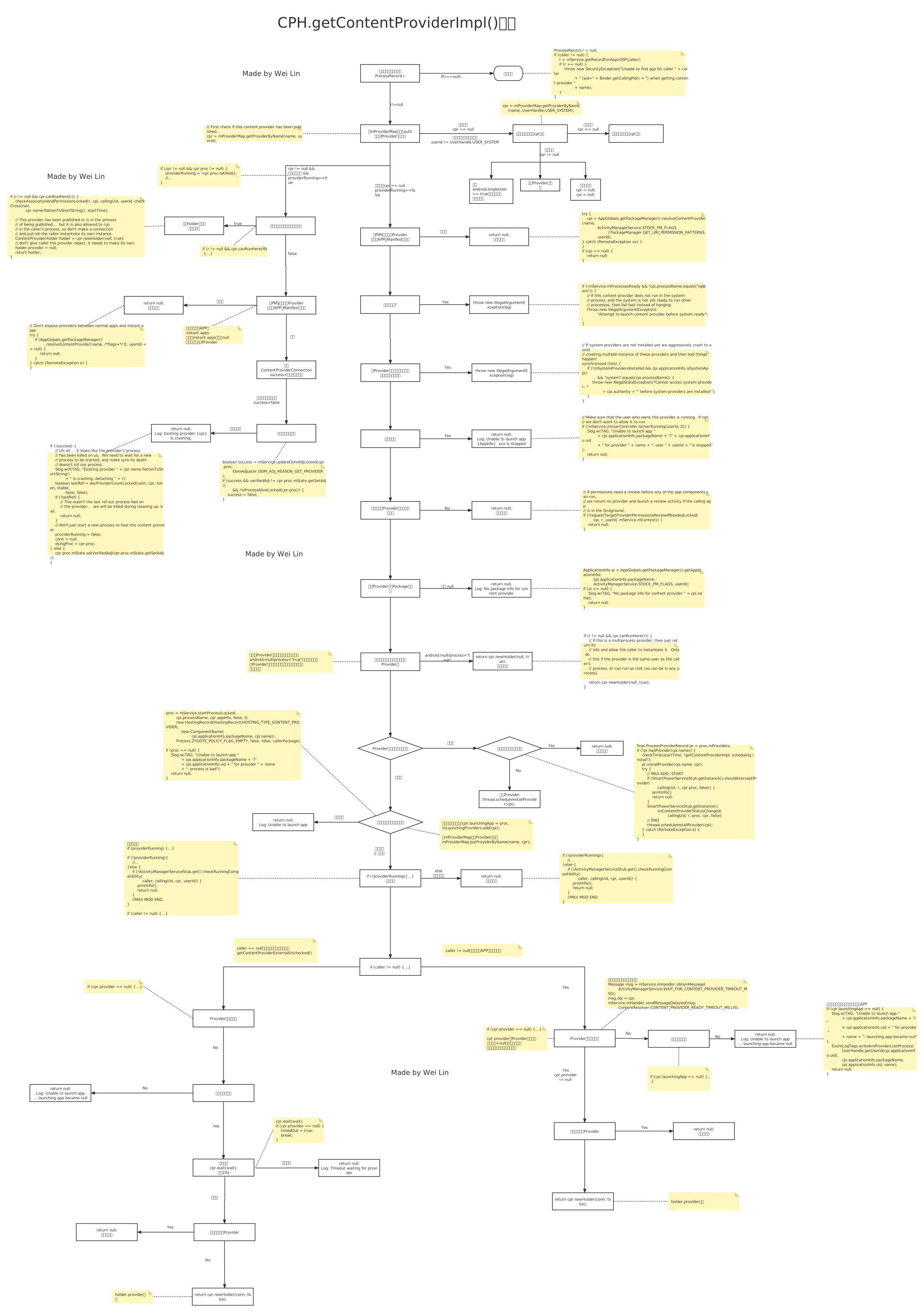
getContentProviderImpl()中代码很多,有很多判断流程,这里暂不详细说明。
如果Provider所在进程未启动,则在此处启动进程。
proc = mService.startProcessLocked(
        cpi.processName, cpr.appInfo, false, 0,
        new HostingRecord(HostingRecord.HOSTING_TYPE_CONTENT_PROVIDER,
            new ComponentName(
                    cpi.applicationInfo.packageName, cpi.name)),
        Process.ZYGOTE_POLICY_FLAG_EMPTY, false, false);
checkTime(startTime, "getContentProviderImpl: after start process");
if (proc == null) {
    Slog.w(TAG, "Unable to launch app "
            + cpi.applicationInfo.packageName + "/"
            + cpi.applicationInfo.uid + " for provider " + name
            + ": process is bad");
    return null;
}
ContentProviderRecord.newHolder()
返回一个ContentProviderHolder对象。
ContentProviderHolder中保存了ContentProvider的相关信息,它含有ProviderInfo(包含了contentProvider的授权URI,读写权限等信息),ContentProvider的引用,IBinder(这其实是一个服务端的ContentProviderConnection对象,其继承了BInder,用来作为客户端与服务端的链接)
获取stableProvider
ContentResolver.acquireProvider(uri)
public final IContentProvider acquireProvider(Uri uri) {
    if (!SCHEME_CONTENT.equals(uri.getScheme())) {
        return null;
    }
    final String auth = uri.getAuthority();
    if (auth != null) {
        return acquireProvider(mContext, auth);
    }
    return null;
}
ACR.acquireProvider(c,auth)
ACR=ApplicationContentResolver
protected IContentProvider acquireProvider(Context context, String auth) {
    return mMainThread.acquireProvider(context,
            ContentProvider.getAuthorityWithoutUserId(auth),
            resolveUserIdFromAuthority(auth), true);
}
AT.acquireProvider(c,auth,true)
由于之前已通过UnstableProvider将Provider添加到本地,所以在本地记录中搜索并返回provider引用即可。
final IContentProvider provider = acquireExistingProvider(c, auth, userId, stable);
if (provider != null) {
    return provider;
}
AT.acquireExistingProvider()
在mProviderMap中搜索provider记录。
public final IContentProvider acquireExistingProvider(
        Context c, String auth, int userId, boolean stable) {
    synchronized (mProviderMap) {
        final ProviderKey key = new ProviderKey(auth, userId);
        final ProviderClientRecord pr = mProviderMap.get(key);
        if (pr == null) {
            return null;
        }

        IContentProvider provider = pr.mProvider;
        IBinder jBinder = provider.asBinder();
        if (!jBinder.isBinderAlive()) {
            // The hosting process of the provider has died; we can't
            // use this one.
            Log.i(TAG, "Acquiring provider " + auth + " for user " + userId
                    + ": existing object's process dead");
            handleUnstableProviderDiedLocked(jBinder, true);
            return null;
        }

        // Only increment the ref count if we have one.  If we don't then the
        // provider is not reference counted and never needs to be released.
        ProviderRefCount prc = mProviderRefCountMap.get(jBinder);
        if (prc != null) {
            incProviderRefLocked(prc, stable);
        }
        return provider;
    }
}
查询数据
IContentProvider.query()
函数返回到ContentResolver.query()中,继续向下执行IContentProvider.query().
IContentProvider的实现位于ContentProvider.java中的内部类Transport。在这里调用mInterface.query(),mInterface是一个ContentInterface接口,由ContentProvider实现。
class Transport extends ContentProviderNative {
    volatile AppOpsManager mAppOpsManager = null;
    volatile int mReadOp = AppOpsManager.OP_NONE;
    volatile int mWriteOp = AppOpsManager.OP_NONE;
    volatile ContentInterface mInterface = ContentProvider.this;

    ContentProvider getContentProvider() {
        return ContentProvider.this;
    }

    @Override
    public String getProviderName() {
        return getContentProvider().getClass().getName();
    }

    @Override
    public Cursor query(String callingPkg, @Nullable String attributionTag, Uri uri,
                        @Nullable String[] projection, @Nullable Bundle queryArgs,
                        @Nullable ICancellationSignal cancellationSignal) {
        uri = validateIncomingUri(uri);
        uri = maybeGetUriWithoutUserId(uri);
        if (enforceReadPermission(callingPkg, attributionTag, uri, null)
            != AppOpsManager.MODE_ALLOWED) {
            // The caller has no access to the data, so return an empty cursor with
            // the columns in the requested order. The caller may ask for an invalid
            // column and we would not catch that but this is not a problem in practice.
            // We do not call ContentProvider#query with a modified where clause since
            // the implementation is not guaranteed to be backed by a SQL database, hence
            // it may not handle properly the tautology where clause we would have created.
            if (projection != null) {
                return new MatrixCursor(projection, 0);
            }

            // Null projection means all columns but we have no idea which they are.
            // However, the caller may be expecting to access them my index. Hence,
            // we have to execute the query as if allowed to get a cursor with the
            // columns. We then use the column names to return an empty cursor.
            Cursor cursor;
            final Pair<String, String> original = setCallingPackage(
                new Pair<>(callingPkg, attributionTag));
            try {
                cursor = mInterface.query(
                    uri, projection, queryArgs,
                    CancellationSignal.fromTransport(cancellationSignal));
            } catch (RemoteException e) {
                throw e.rethrowAsRuntimeException();
            } finally {
                setCallingPackage(original);
            }
            if (cursor == null) {
                return null;
            }

            // Return an empty cursor for all columns.
            return new MatrixCursor(cursor.getColumnNames(), 0);
        }
        Trace.traceBegin(TRACE_TAG_DATABASE, "query");
        final Pair<String, String> original = setCallingPackage(
            new Pair<>(callingPkg, attributionTag));
        try {
            return mInterface.query(
                uri, projection, queryArgs,
                CancellationSignal.fromTransport(cancellationSignal));
        } catch (RemoteException e) {
            throw e.rethrowAsRuntimeException();
        } finally {
            setCallingPackage(original);
            Trace.traceEnd(TRACE_TAG_DATABASE);
        }
    }
    //......
}
ContentInterface.query()
ContentInterface接口由ContentProvider实现。
public abstract class ContentProvider implements ContentInterface, ComponentCallbacks2 {...}
这里实际调用的是用户自定义的ContentProvider。
MyContentProvider.query()
自定义的ContentProvider。
@Override
public Cursor query(Uri uri, String[] projection, String selection,
                    String[] selectionArgs, String sortOrder) {
    Log.d(TAG, "query Excuted");

    SQLiteDatabase db = dbHelper.getReadableDatabase();
    Cursor cursor = null;
    switch (uriMatcher.match(uri)) {
        //...
        default:
            break;
    }
    return cursor;
}
其它调用过程
总结
- ActivityThread.acquireProvider()
无论增删改查,都要获取到目标Provider,所以都要走到ActivityThread.acquireProvider(context, auth, userId, stable)这一步。
- 抛出异常
查询是通过不稳定连接进行的,增删改获取的是稳定连接。稳定连接如果获取Provider对象失败,会抛出异常。
IContentProvider provider = acquireProvider(url);
if (provider == null) {
    throw new IllegalArgumentException("Unknown URL " + url);
}
添加数据insert()
APP端用户调用:
getContentResolver().insert(uri, values);
APP端-Framework过程:
ContentResolver.insert(2 args) ->
ContentResolver.insert(3 args) ->
ContentResolver.acquireProvider(auth) ->
ContextImpl.ApplicationContentResolver.acquireProvider(context,auth) ->
ActivityThread.acquireProvider()
AMS端:
AMS.getContentProvider() ->
ContentProviderHelper.getContentProvider() ->
ContentProviderHelper.getContentProviderImpl() ->
ContentProviderRecord.newHolder()
APP端在ActivityThread.acquireProvider()中获取到IContentProvider对象,返回到ContentResolver.insert(3 args)中,之后便可以通过该对象实现对数据的增删改查。
IContentProvider.insert() ->
ContentProvider.Transport.insert() ->
ContentInterface.insert() ->
MyContentProvide.insert()
通过ContentInterface.insert()回调到目标ContentProvider自定义的query方法。
删除数据delete()
APP端用户调用:
getContentResolver().delete(uri, where, selectionArgs);
APP端-Framework过程:
ContentResolver.delete(3 args) ->
ContentResolver.delete(2 args) ->
ContentResolver.acquireProvider(auth) ->
ContextImpl.ApplicationContentResolver.acquireProvider(context,auth) ->
ActivityThread.acquireProvider()
其余过程同上。
修改数据update()
APP端用户调用:
getContentResolver().update(uri, values, where, selectionArgs);
APP端-Framework过程:
ContentResolver.update(4 args) ->
ContentResolver.update(3 args) ->
ContentResolver.acquireProvider(auth) ->
ContextImpl.ApplicationContentResolver.acquireProvider(context,auth) ->
ActivityThread.acquireProvider()
其余过程同上。
call()调用
APP端用户调用:
getContentResolver().call(auth, method, arg, extras);
APP端-Framework过程:
ContentResolver.call() ->
ContentResolver.acquireProvider(auth) ->
ContextImpl.ApplicationContentResolver.acquireProvider(context,auth) ->
ActivityThread.acquireProvider()
其余过程同上。
其它
CPH.getContentProviderImpl()流程图
CPH=ContentProviderHelper
unstableProvider与stableProvide的区别
具体在请求过程中的区别见getContentResolver().query(),另外Provider所在进程被杀后,对客户端进程的处理也有所区别。
通过forceStopPackage()来杀掉 Provider所在进程的流程如下:
AMS.forceStopPackage() ->
AMS.forceStopPackageLocked() ->
AMS.forceStopPackageLocked() ->
CPH.removeDyingProviderLocked()
在removeDyingProviderLocked()中:
ProcessRecord capp = conn.client;
final IApplicationThread thread = capp.getThread();
// 如果有通过stable Provider连接的客户端
if (conn.stableCount() > 0) {
    final int pid = capp.getPid();
    if (!capp.isPersistent() && thread != null
            && pid != 0 && pid != ActivityManagerService.MY_PID) {
        // 杀死客户端进程
        capp.killLocked(
                "depends on provider " + cpr.name.flattenToShortString()
                        + " in dying proc " + (proc != null ? proc.processName : "??")
                        + " (adj " + (proc != null ? proc.mState.getSetAdj() : "??") + ")",
                ApplicationExitInfo.REASON_DEPENDENCY_DIED,
                ApplicationExitInfo.SUBREASON_UNKNOWN,
                true);
    }
} else if (thread != null && conn.provider.provider != null) {
    // 如果只有通过unstable Provider连接的客户端
    try {
        // 则只是通知客户端,不会杀死客户端
        thread.unstableProviderDied(conn.provider.provider.asBinder());
    } catch (RemoteException e) {
    }
    // In the protocol here, we don't expect the client to correctly
    // clean up this connection, we'll just remove it.
    cpr.connections.remove(i);
    if (cpr.proc != null && !hasProviderConnectionLocked(cpr.proc)) {
        cpr.proc.mProfile.clearHostingComponentType(HOSTING_COMPONENT_TYPE_PROVIDER);
    }
    if (conn.client.mProviders.removeProviderConnection(conn)) {
        mService.stopAssociationLocked(capp.uid, capp.processName,
                cpr.uid, cpr.appInfo.longVersionCode, cpr.name, cpr.info.processName);
    }
}
所以区别就是:
- 对于stableProvider,如果provider所在进程被杀,则客户端进程也会被杀;
- 对于unstableProvider,如果provider所在进程被杀,则客户端只是移除Provider连接,并不会被杀掉。
在执行query()的时候使用的是unstableProvider,但是返回给调用方的Curosr 使用的是stableProvider。这表示在 Cursor 没有被 close 之前,只要 provider所在进程死亡,则客户端进程也会被杀掉。
为什么要区分是否稳定连接?
ContentResolver只会在query()时使用unstableProvider,其它接口的调用inser()、delete()、update()、call()都只是使用stableProvider。
之所以只在query()中使用unstableProvider,是因为只是查询数据,并不涉及写入,而手机中query()的调用也是最多的,所以需要先通过unstableProvider查看一下目标数据是否存在,如果不存在客户端进程也不会crash,如果存在并能正常访问再建立stableProvider。
而如果像其它接口那样一开始就使用stableProvider,如果访问不到数据则会直接抛出异常,这对于使用较为频繁的query()来说是不可接受的。